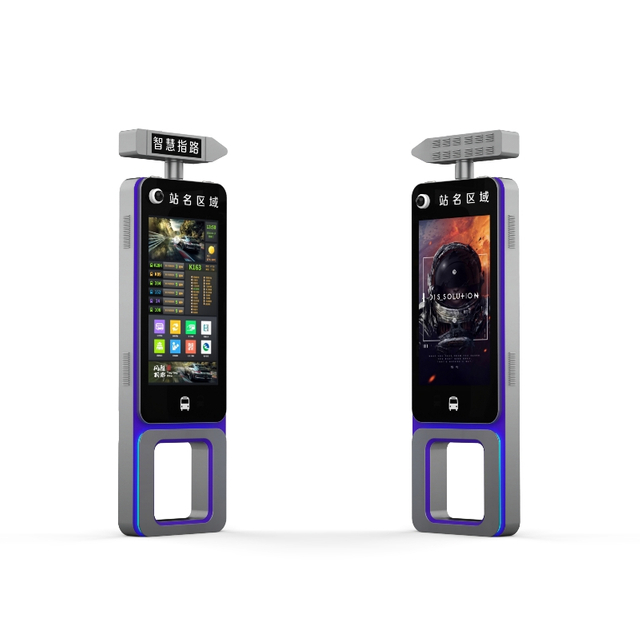
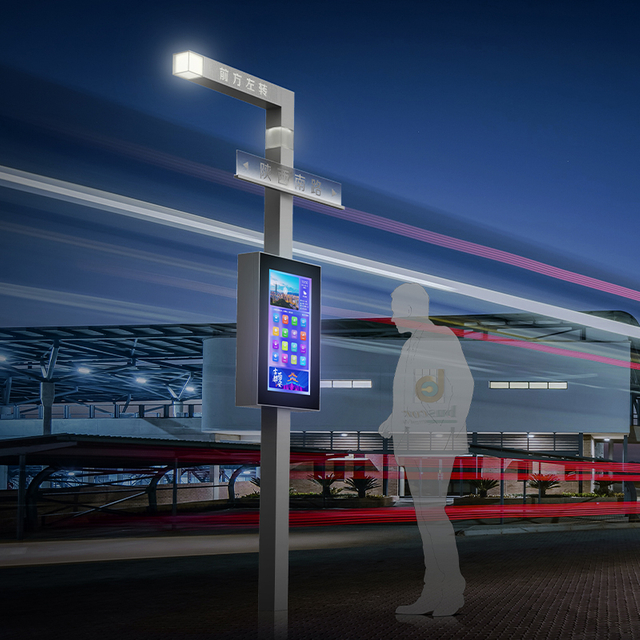
Visitors rarely get lost because a space has no signs; they lose time when directions are outdated, poorly placed, or unable to reflect route changes. Digital Signage And Wayfinding turns maps, directional prompts, service notices, and real-time updates into a clearer navigation experience, helping people confirm where they are and what to do next. For transport hubs, campuses, commercial spaces, and public service areas, better wayfinding means fewer wrong turns, less hesitation, and a smoother journey from arrival to destination.
Better Directional Decisions at the Exact Point of Confusion
Turning “Where am I?” into an immediate answer
Wayfinding efficiency begins in the first few seconds after a person enters a space. If the visitor cannot quickly understand their current position, every later decision becomes slower. A clear digital display can reduce that uncertainty by showing a “You are here” point, nearby landmarks, key destination categories, and the next useful action.
This matters in building entrances, transit hubs, campuses, commercial complexes, parks, and public service centers. People in these places are often moving with a purpose, but they may not understand the layout. A static directory can list every department, shop, platform, or facility, yet still fail to answer the immediate question: “Where do I go now?”
Digital Signage And Wayfinding works best when it narrows the user’s choices rather than displaying everything at once. A screen near an entrance might highlight the most searched destinations, the nearest elevator, accessible routes, restrooms, service counters, exits, or transfer points. When the screen presents the next step clearly, visitors do not need to stop for long, scan multiple boards, or ask staff for basic directions.
Reducing hesitation at intersections, exits, and service areas
The most valuable placement for digital guidance is not always the most visible wall. It is often the point where users must make a decision. Intersections, exits, elevator lobbies, ticket areas, transit platforms, parking connections, and service counters are where people hesitate, turn back, or follow the wrong path.
At these locations, the screen should not behave like a general information board. It should answer the specific decision in front of the user. A visitor at a corridor junction needs a direction arrow and a destination confirmation. A passenger near a platform needs route, gate, or schedule information. A customer in a public service building needs to know whether to go to a counter, waiting area, self-service kiosk, or appointment zone.
ZEMSO-BS-0005 is relevant here because it is designed for intelligent transportation hubs, smart cities, campuses, commercial complexes, and public service environments. Its intelligent path planning and clear navigation guidance functions are useful when a project needs more than a screen that only displays fixed images.
Wayfinding Decision-Point Map
Location type
User’s likely question
Best digital signage content
Main entrance
“Where do I start?”
Overview map, current location, main destination search
Corridor intersection
“Which direction now?”
Direction arrow, next step, nearby landmark
Transit area
“Has my route changed?”
Arrival updates, platform changes, service notices
Service center
“Which counter should I use?”
Department directory, queue information, appointment guidance
Outdoor public area
“Which path is fastest?”
Area map, landmark route, accessible path option
Real-Time Information Keeps Routes Accurate
Static signs fail when spaces change
Static signs work when the environment is stable. Public spaces, however, are rarely stable for long. Entrances may be changed during construction, routes may close for maintenance, event layouts may shift from one day to the next, and service counters may be reassigned during busy periods. In transport spaces, platform changes, emergency notices, weather disruption, and temporary access rules can make yesterday’s sign inaccurate today.
Digital Signage And Wayfinding improves route reliability because content can be updated centrally. A facility manager does not need to print temporary notices, place paper arrows, or wait for physical sign replacement every time a route changes. Updated instructions can appear across multiple displays, helping visitors follow the current route instead of relying on outdated information.
This is especially useful in spaces where incorrect directions create wider operational problems. A wrong turn in a hospital, government building, airport, station, or exhibition hall is more than an inconvenience. It can delay appointments, increase crowding, create frustration, and force staff to spend time answering repetitive navigation questions.
Route updates can also improve crowd movement
Wayfinding is not only about helping one visitor reach one destination. In large public environments, it also shapes how people move as a group. When many visitors follow the same unclear route, congestion builds around entrances, escalators, service counters, corridors, or exits.
A connected digital signage system can guide people toward less crowded routes, alternative entrances, temporary detours, or available service areas. This is useful in transportation hubs, smart city public areas, exhibition halls, large commercial spaces, campuses, and government service centers. If one path becomes blocked or overcrowded, updated screens can direct visitors before they reach the problem area.
Crowd guidance should remain simple. The screen does not need to explain every operational reason behind a route change. It only needs to make the next action clear: use another entrance, follow a temporary path, proceed to a different counter, or avoid a closed section.
Remote content control reduces operational friction
The operational benefit becomes stronger when a site uses multiple displays. ZEMSO-BS-0005 supports cloud-based CMS control, remote publishing, device monitoring, and OTA updates, making it suitable for projects where information must stay consistent across several public display points.
For operators, this reduces the gap between a layout change and public communication. Instead of relying on manual sign replacement, teams can update maps, notices, route instructions, and service information from a central system. That makes digital signage less about decoration and more about keeping the wayfinding environment accurate.
Interactive Guidance Helps More Users Navigate Independently
Searchable destinations make guidance more personal
Different users enter the same space with different goals. A commuter may want the fastest route to a platform. A first-time visitor may need a simple overview before moving forward. A tourist may need multilingual guidance, while a person with mobility needs may need a route that includes elevators, ramps, or barrier-free access.
Static signs usually force these different users to interpret the same information in the same way. Interactive digital displays can make the experience more personal without adding more physical signboards. A searchable destination list, route filter, floor directory, landmark map, or service category menu can help each user find the information that matters to them.
This is where Digital Signage And Wayfinding becomes more efficient than a traditional sign system. It does not only point in one direction. It helps users search, confirm, compare, and act. When the interface is designed well, the visitor can complete the navigation task independently instead of asking staff for help.
Voice, touch, and AI interaction reduce dependence on staff
Interaction matters most in complex spaces. Public service centers, transportation hubs, campuses, tourist areas, and large commercial environments often have too many destinations for one static board to explain clearly. A touchscreen can let users search by name, category, service type, or floor. Voice interaction can help when users have difficulty typing, carrying luggage, or reading a dense menu quickly.
ZEMSO-BS-0005 supports touchscreen and voice interaction, TTS, image analysis, passenger flow statistics, edge AI, and digital human Q&A functions. These functions should be used to shorten the route-finding process, not to make the screen feel artificially “smart.” A digital human or voice interface is useful only when it helps users reach a destination, understand a service process, or solve a route question faster.
Accessibility should be built into the experience
Accessible wayfinding is part of efficiency because a system that only works for some users still creates delays and confusion. Visual clarity, readable font sizes, strong contrast, consistent icons, simple menu depth, reachable screen height, and audio support can all affect whether people can use a wayfinding screen independently. Directional and informational signs also need clear visual presentation so users can understand them quickly in real public environments.
Digital screens should also work with the physical environment. A route on the screen must match the names, colors, icons, and landmarks used on walls, doors, elevators, and printed signs. If a screen says “North Lobby” but the building signs say “Entrance B,” the user has to translate the system while moving.
For accessible route planning, the system should make barrier-free options visible rather than hidden in a secondary menu. Elevators, ramps, wider paths, accessible restrooms, and step-free connections should be easy to identify. This keeps Digital Signage And Wayfinding focused on real navigation support instead of treating accessibility as an afterthought.
Good Placement and Simple Content Decide Whether the System Works
Put screens where people naturally pause
A digital wayfinding system can fail if the screen is placed in the wrong location.Good placement follows the user’s movement. Overview displays belong near arrivals, where people need orientation before choosing a route. Confirmation screens work well after major turns, where visitors need reassurance that they are still moving in the right direction. Interactive kiosks are better near waiting or open areas, where people can use the screen without blocking traffic.
Outdoor and semi-outdoor spaces need additional hardware consideration. Bright sunlight, weather exposure, dust, and public use can affect screen visibility and durability. ZEMSO-BS-0005’s IP65-rated design is relevant in outdoor or demanding public environments where the display needs protection against challenging conditions.
Do not overload wayfinding screens with too much content
The biggest content mistake is treating a wayfinding screen like a general advertising display. Maps, promotional images, announcements, brand messages, menus, news, and service notices can quickly compete for attention. When everything is emphasized, directions become harder to find.
A useful screen should follow a clear hierarchy. Current location comes first because users need to orient themselves. Destination search or destination categories should come next. The route instruction should then show the next action, not an overwhelming full explanation of every possible path.
Service alerts and emergency messages should take priority when they affect movement. Secondary public information can still appear, but it should not hide the route. Efficient Digital Signage And Wayfinding is measured by how quickly people act correctly, not by how much content the screen can display.
Connected Wayfinding Systems Improve Long-Term Urban Operations
Usage data shows where navigation problems happen
A connected system can help operators understand where people struggle. Search behavior may show which destinations visitors look for most often. Screen usage can reveal which locations create the most navigation questions. Passenger flow or visitor movement data can highlight overcrowded entrances, confusing intersections, weak signage zones, or service areas that need clearer guidance.
This turns wayfinding from a one-time installation into a continuous improvement tool. Instead of guessing where to add signs, operators can review how people actually use the space. When a destination is searched repeatedly from the same location, the route may need clearer naming, better placement, or additional confirmation signs.
ZEMSO-BS-0005 includes passenger flow statistics, which can support this type of operational insight when used as part of a broader public information system. The data should not be collected for its own sake. Its value comes from helping the site reduce confusion and improve movement.
Integration makes wayfinding more useful over time
Digital signage becomes more useful when it connects with the systems that affect the visitor journey. Transit arrival data, public notices, emergency alerts, facility directories, parking information, event schedules, and maintenance updates can all change what route a person should take. If these updates remain separate from wayfinding screens, visitors may still receive incomplete guidance.
ZEMSO-BS-0005 supports open APIs, standardized interfaces, and third-party system integration, which fits smart city and public service scenarios where displays need to connect with other platforms. For operators, integration helps keep the wayfinding system aligned with real conditions. For users, it creates a smoother experience because directions, notices, and service information no longer feel disconnected.
Conclusion
Digital Signage And Wayfinding improves efficiency by giving people clearer choices at the exact moments when they need direction. Instead of relying on fixed signs alone, facilities can guide visitors with updated routes, interactive maps, accessible information, and content that adapts to changing public spaces. For transport hubs, campuses, commercial areas, and smart city projects, Shanghai Zemso Urban Furniture Technology Co., Ltd. provides digital signage and wayfinding solutions that help reduce confusion, support smoother movement, and create a more practical, user-friendly navigation experience.